Sunday, January 7, 2018

VLOOKUP - Quick Reference

Today i was using VLOOKUP after long (as was involved in Data Migration validation) and i kind of struggled a bit initially. It is straightforward once you know it, but if you have forgotten the mechanism and the logic behind it, it takes a few, not much, but a few iterations to get it right. The purpose of this quick reference blog post is to stop wasting the time in re-inventing the feature in future, if i not use it for long again. This is typical right, once you stop using what you have learnt, your brain tend to either delete it from your memory or keep it somewhere else in the memory, so that it can focus on the recent learning or tend to focus on what matters you most.

I am going to write this post in the language that i would understand once i refer to it in future.

VLOOKUP is simply finding a corresponding value for a desired constant, from a stack of huge data. For example, there may be a excel sheet with 10,000 rows and 19 columns. You know that 1st column is the list of employee id and all the other columns could have different set of data like, salary, leaves, role, employee name, project allocation, reporting manager and years of experience etc. 

Now if someone asks you to prepare a report for 2000 random employees out of 10,000 and they wish to include values from some random 8 columns out of 19, then there are potentially two ways to do it. Either manually search for each and every employee and then search for the corresponding values in the respective columns and then create the report, which is tedious and time consuming or simply use VLOOUP feature. 

Before using VLOOKUP, we shall first look at the contents of VLOOKUP.

VLOOKUP(lookup_value, table array, col_index_num, [range_lookup])

In our example, we will create a new excel sheet with first column being the employee ID (with employee IDs populated) and then the 18 columns for which we require the data. The next 18 columns is where we will be applying the VLOOKUP.

For example the first column is employee id and the first value in the employee ID column is 001 and is in cell A1.

Assume that we wish to find the employee name in the second column.We will apply the VLOOKUP in the second column i.e. Employee name .

The formula will be as follows:

VLOOKUP(A1, table array, col_index_num, [range_lookup])

lookup_value - will be the cell reference of the cell in which employee ID '001' resides, in the new result / report sheet.

table array - is the source of data where you are trying to find the corresponding value ( Employee name, in this case). In our case it will be the entire source sheet with 10,000 rows and 19 columns.

col_index_num - This is the most important parameter. This value is the COLUMN NUMBER from the SOURCE SHEET, where the desired values resides (desired value in this case is Employee name).

For example in the source sheet (with 10,000 rows and 19 columns), the first column is Employee ID and the employee name column is 12, counting from Employee ID, then the col_index_num value will be 12. This will tell the system to fetch the corresponding value from column 12 from the source sheet.

[range_lookup] - This value is either 0 (False, Exact match) or 1 (True, Approximate match). We will mostly (99% of the time) select 0, as hardly we will be interested in approximate value.

But to explain this in more detail, please look at the example below:

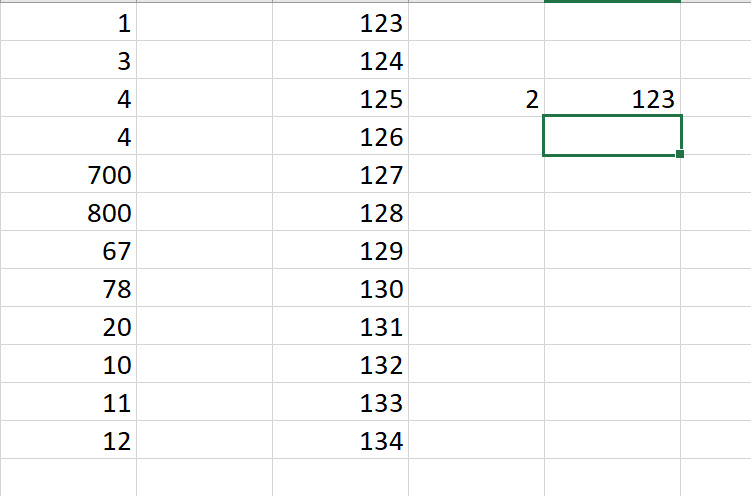
In the screenshot below, we are trying to find the value for '2'. However '2' is not present in source data. In this case, if the  [range_lookup] value is '0' .i.e. Exact match (False), then the system displays an '#N/A' error.

[range_lookup] value is '0'col_index_num value = '3' (as 'L' is 3 columns away from 'J')
No 'EXACT' value for '2' hence error is displayed '#N/A'

Now if the [range_lookup] value is changed to '1', the system will return the next largest value, that is less than your specific lookup value. In this case it is '123'.

[range_lookup] value is '1'col_index_num value = '3' (as 'L' is 3 columns away from 'J')
No 'APPROXIMATE' value for '2' is found, hence largest value less than to the corresponding look up value (which is value against '1' in this case) is displayed, which is '123'


This is quick reference for VLOOKUP, for me. Hope i will not have to use this post again to remind me of VLOOKUP. But if at all i had to, this post should help me refresh the learning and i should hopefully spend less time reinventing this functionality in future.

Thanks
Sarang

Wednesday, December 13, 2017

Reverting the transaction status from 'Selected for credit note' back to 'Invoiced'

I just now came to know a way of reverting the SAME project transaction which is in 'Selected for credit note' back to 'Invoiced'.
When the project transaction is invoiced, the 'Transaction status' is changed to 'Invoiced':

When you select the transaction for credit note, the 'Transaction status' is changed to 'Selected for credit note'


I was wondering how do i put this 'Transaction status' back to 'Invoiced' as i selected the transaction mistakenly for credit note.
I got to know this today from one of my colleague. The solution is to just run the process again and 'Deselect' the transaction, which will revert the 'Transaction status' from 'Selected for credit note' to 'Invoiced'.
When clicked 'Ok', the system reverts the 'Transaction status' from 'Selected for credit note' back to 'Invoiced'.
The reason for knowing this was, i was getting stuck while posting an estimate on a % complete fixed price project. The on-account transaction based on which system calculates the accrued revenue was in the 'Selected for credit note' state and hence system was giving the error :
"On account cannot be chosen for type project and ID"
Had i known this process of reverting the transaction status back to 'Invoiced' i would have been successful in posting the estimate.

Thanks 
Kind Regards
Sarang

Thursday, November 30, 2017

Two IMP things to remember before a presentation - from posting perspective

The reason to write this post is to take a not of a major disaster i faced while i was presenting the solution to bunch of individuals, who were supposed to test it later and ingrain that learning so that i never forget again.


Batch transfer rules


This small setting can take your presentation to an all together different disastrous path. I had my presentation planned in the afternoon and i tested the complex custom-built functionality since morning, thrice and it all worked perfect, the way it should. The postings were correct, the vouchers were correct, the accounting was correct. I tested the entire end-to-end process and i was so convinced that i would rock the presentation as i was confident about everything and i believed that i really have understood the process and i can deliver the same with that passion and energy. I started my presentation confidently and the moment i posted the first (expense) transaction, i just clicked on the voucher to show the users which accounts are debited and credited. When i clicked on the voucher, it was blank and i was so surprised and sad to see that. The functionality which was working 10 mins back, which i did test (and not once) since morning, what happened suddenly, i could not believe. But as i had previously posted transactions i continued. However i was depressed and my entire presentation was then carried out in a "not so good" manner, though i tried to save the situation by showing previously posted transactions, along with some wit and humor.

After the presentation was over, whilst we were technically trying to find out what must have gone wrong, the technical consultant, finally found out the cause. He said that within those 10 mins before presentation, someone changed the setting of the "Batch transfer rules" from SYNCHRONOUS to SCHEDULED BATCH. I knew this setting but i completely forgot when the fiasco happened in front of the audience. The biggest learning for me, from this incident is, always have a plan B ready, you never know what could go wrong, even if everything is tested and all is working before the presentation. Second most important thing which now i have made a mental note is, to always check for this parameter FIRST whenever i will not see a voucher for a posted transaction in future.

Posting Profile setup in parameters

I mostly work on the projects side of things in the application, hence sometimes you tend not to remember the settings in the other modules. And when that happens then you waste lot of time and energy investigating the issue related to that. "Posting Profile setup in parameters" is kind of basic setting for the people working in the 'Trade and logistics' space, but because projects span across many modules in AX and because you tend to focus more on the settings in that area, you need to forget this sometimes. Also because these settings are mostly done by other team, hence you tend to assume that the settings are in place and this then leads you to forget those settings. Enough of introduction now.

The customer and supplier posting profiles were all in place, with all the necessary accounts etc. even after that when i was processing the supplier invoice, i was getting this error:

"The transactions on the voucher XXXX do not balance as per . (accounting currency: $ - reporting currency: $ "

People working in AX domain will know that something is wrong either with posting profile or with exchange rate. I checked both (supplier posting profile) and all looked fine. The only thing i did not check was whether that same posting profile is configured / called in the parameters. Once that was done, the error was gone and it was all good. The learning for me this was, that not only to check the posting profiles but also to check whether they are called from the respective parameters.


The reason to write these trivial things down was to avoid re-inventing the wheel in future, if at all, i face another memory loss with respect to these settings and errors. :-)

Thanks
Sarang


Sunday, October 22, 2017

Accounting distributions VERSUS Source document

I have summarized the system behavior for "Accounting distributions" and "Source document" parameter setting in General Ledger module in the form of an excel table, for easy understanding and future reference. The example below is to explain the dimension initialization on the vendor invoice, with respect to the setting and its impact on the postings done to the general ledger.

Account distributions - The posting to the summary (Accounts Payable aka AP in this case) will always take the dimension from the Purchase order lines.

Source document -  The posting to the summary (Accounts Payable aka AP in this case) will always take the dimension from the Purchase order header, which is initialized on the Purchase order, from the Vendor master (hence the parameter name is called 'Source document') and which can be changed on the Purchase order header .


Thanks
Sarang

Friday, June 9, 2017

Item requirements, Chargeable categories and No project transaction voucher

I would like to quickly register the three important points that i encountered.

1. Item requirement record on Project record

When all the three parameters are switched on for auto creation of item requirement record (for cost consumption on project on product receipt) on project, we expect the 'Item requirement' and eventually the Sales order record to be auto created and we tend to search the item requirement record at Project management and accounting > Project > All projects > Project record > Plan tab > Item requirements > Item requirements.


However no item requirement record is seen there in the new version of AX. Instead ONLY a Sales Order record is silently created and can be seen at Manage > Related information > Item tasks > Sales orders. Not sure whether this is a bug but this is how the system is behaving now.


So when the Product receipt is posted on the project PO, the accrual postings can be seen in the voucher created for the receipt and the project cost consumption voucher can be seen on the delivery note on SO.

2. Chargeable categories

When the user navigates to the project contract record to create the billing rule, the user needs to select the 'Chargeable categories'. However when i was trying to do that on a newly configured system, i could see no categories in the 'Available categories' section. I quickly realized that some setup was missing. And then found out that the setup that was missing was the 'Active in journals' checkbox. Once that was clicked, the categories started appearing in the 'Chargeable categories' section.

3. Voucher not seen on the posted project transactions

There can be many reasons for the voucher not seen. But the first thing in this case that should be checked is whether the posting parameter is Synchronous, Asynchronous or Scheduled batch. If the setting is Asynchronous or Scheduled batch, then the voucher will only be seen after the posting has happened from the sub-ledger to general ledger. Hence this setting should always be Synchronous. By default when the company is created in AX, the default setting is Scheduled batch.


Thanks
Sarang


Tuesday, May 16, 2017

Product receipt postings with and without Item Requirement on the Project

Item requirements NOT used on the project

When the Item requirements are not used on the Project, then at the time of Project PO receipt postings, cost is not consumed on the project. Please find below the postings at the time of product receipt and supplier invoice.

PO created for an Item A for GBP 4000.

PO receipt postings

Dr Cost of purchase material received 4000
   
      Cr Purchase accrual 4000


PO invoice posting

Dr Project Cost 4000
      Project WIP cost item 4000
      Purchase accrual 4000
      Cost of purchase materials invoiced 4000
      VAT 800  

      Cr  Stock Issue 4000 
            Project cost item 4000
            Cost of purchase material received 4000
            Supplier 4800

Stock Issue posting is taken from:

Stock management > Setup > Posting > Posting


Item requirements used on the project

When the Item requirements are used on the Project, then at the time of Project PO receipt postings, cost is consumed on the project. Please find below the postings at the time of product receipt and supplier invoice.

PO created for an Item A for GBP 4000.

PO receipt postings

Dr Cost of purchase material received 4000
      Project WIP cost item 4000
      Project Cost 4000

      Cr Purchase accrual 4000
            Project cost item 4000
            Cost of units invoiced 4000


PO invoice posting

Dr Purchase accrual 4000
      Cost of purchase materials invoiced 4000
      VAT 800  

      Cr Cost of purchase material received 4000
            Supplier 4800

Cost of units invoiced posting is taken from:

Stock management > Setup > Posting > Posting
If you compare both the postings you will notice that the postings are almost the same other than timing of them getting posted in the system.For the product receipt posting where the item requirement is used, the additional posting of the project costs are the ones which are posted normally at the time of invoicing when the item requirement is not used.

One other difference is the use of  'Cost of units invoiced' instead of 'Stock Issue' at the time of posting the receipt when the 'Item requirement is used. The reason the posting is taken from Sales Order section is, Item requirement creates a SO in the background to get this cost posting on to the project. It replaces the 'Stock Issue' posting highlighted in RED above with the  'Cost of units invoiced' .


Latest update (29th July 2019)

The above postings are seen when the costs are set to go to 'Balance'. If the costs are set to go to 'P&L' then the following postings are seen for "Item requirements used on Project":

PO receipt postings

Dr Cost of purchase material received 4000 
      Project Cost 4000 
     
      Cr Purchase accrual 4000 
           
Cost of units invoiced 4000 


PO invoice posting

Dr Purchase accrual 4000 
      Cost of purchase materials invoiced 4000 
      VAT 800   

      Cr Cost of purchase material received 4000 
            Supplier 4800

The interesting thing is though this is an 'Item' type of posting, no posting is to be set for 'Cost - item' and 'WIP - cost value - item'. Ideally, as the project 'Item' costs are set to go to 'P&L' but still no postings are posted, in this case, to 'Cost - item'. Does anyone know whether what i have inferred based on my testing, is correct or not? Please let me know if I am wrong here.

One more interesting thing is, on the 'Stock' posting side, even though postings are not required for 'Purchase expenditure for expense' and 'Purchase expenditure, un-invoiced' system still demands it. I got rid of this issue by setting an error / temporary account (which is out of reporting range).

If I get any further information on this topic, will update.

Thanks
Sarang

Item setup with respect to Procurement category and Project Category.

Item to Procurement category relation

Many items can be a part of single Procurement category. This relation can be obtained by attaching each item with the procurement category from the 'Product categories' option on the 'Setup' tab on the action pane.


When the PO is to be created for all the items related to one procurement category, then on the PO header, the click on the 'Add products'.


This will display the below window, wherein the user will have to select the appropriate procurement category and then the items related to it to be included in the purchase order and then click OK.


This will create relevant lines in the PO with different items linked to the same procurement category.


Note:


  1. PO created for Items linked to Procurement category - When the posting setup is done for item as well procurement category, then in the case where the PO is created for the different items but same procurement category, the posting setup against the individual 'Item' will be used.
  2. PO created for Items  - Posting setup against the individual 'Item' will be used.
  3. PO created for Procurement category - Posting setup against the individual 'Procurement category' will be used.


Item and Procurement category to Project category relation

Items and Procurement categories can be linked to the project categories, so that they can be used for postings in the projects.

Project category is setup on the Item at:


Project category is setup on the Procurement category at:

Product information management > Setup > Categories and attributes > Category hierarchies


Thanks
Sarang