Wednesday, August 22, 2018

Dynamics 365 FinOps workflow - "Company-specific" v/s "Organization-wide" and related setup

Workflows in Dynamics 365 FinOps are of two kind and they are:
  1. Company specific workflows
  2. Organization wide workflows
These workflows are system designed and thats how they are. Details of which workflows are company specific and which ones are organization wide is available on technet. However you could also get to know this when you create workflows. If the 'Association' points to a company like USSI in this example, its company specific workflow and if its 'Organization-wide', its organization wide workflow.

'Company specific' workflow

'Organization-wide' workflow

This is fine, however it gets tricky when you try to define email templates for the same. The reason I say this is tricky is, there two separate navigations in the system to define the email templates for those two types of workflows and thats not very obvious to the end user.

You may define the email template for one type, say 'Company' type and then try to configure it from the wrong navigation for 'Organization-wide'. Just to make it more clearer, the email template creation and configuration for 'Company' type workflow is defined in 'Organization administration' module and the ones for 'Organization-wide' type workflow is defined in 'System administration' module. Let me show you where.

Email template for 'Company' specific workflow

Email template navigation for 'Company specific' workflow
Email template for 'Company specific' workflow
To view all the email templates, user should click on the 'Show / Hide list' icon.

All email templates for 'Company specific' workflow
Company specific email templates are visible in the company specific workflows:


Email templates visible from 'Company specific' workflow

To configure a 'company specific' email template in workflow parameters, user needs to navigate to Organization administration module.
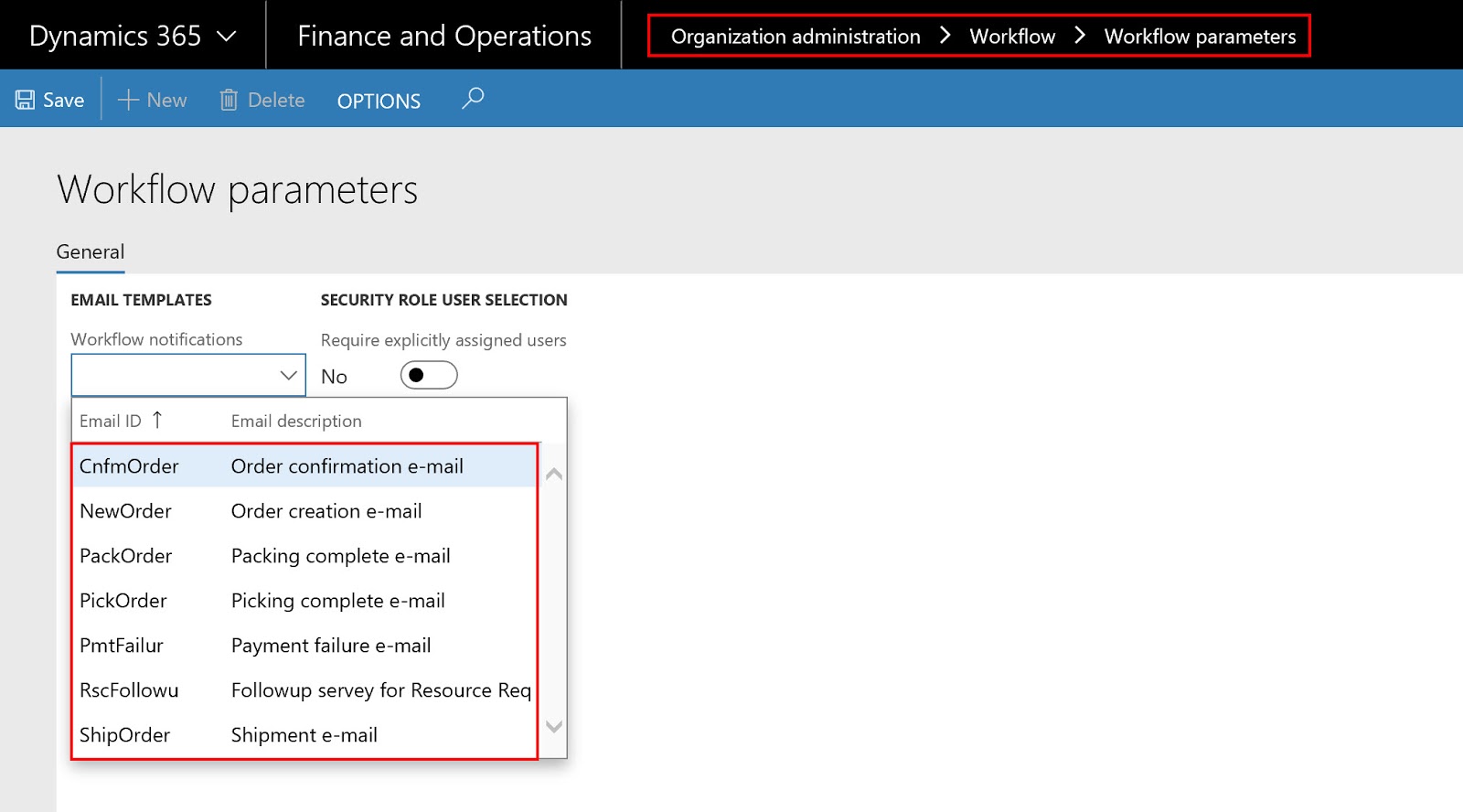
Organization administration > Workflow > Workflow parameters


Email template for 'Organization-wide' workflow


Email template navigation for 'Organization-wide' workflow


Email template for 'Organization-wide' workflow
To view all the email templates user should click on the 'Show / Hide list' icon.

All email templates for 'Organization-wide' workflow

'Organization-wide' email templates are visible in the 'Organization-wide' workflows:

Email templates visible from 'Organization-wide' workflow

To configure a 'Organization-wide' email template in workflow parameters, user needs to navigate to System administration module.

System administration > Workflow > Workflow parameters

Some additional points to remember with respect to the workflow email for both company and organization specific workflows.

Workflow batch creation

Workflow batch needs to be created for the workflow to process. That is done from the 'Workflow infrastructure configuration'.

Workflow infrastructure configuration


Email distributor batch

For the system to send email, there is a batch to be created and run in the background. This is where you do it.

Email distributor batch


SMTP server settings and Email provider 

Technical details around SMTP and Email provider, needs to provided by the system admin.

Email parameters
Email message placeholder in email template

All the notifications specified in the workflow will be emailed to the user if email template has the placeholder specified in it. The email templates can be designed as jazzy as possible, but these are just internal emails, hence they could be as simple as below:

Simple email template with "message" placeholder

This email template will take the message specified in the workflow step and send email message as below:

Workflow notification message
Message will appear in the email message as below. This email is not sent from the system , however i checked it from System administration > Email processing > Email sending status.

Actual email containing the message from the workflow step

Employee email and notification configuration

For the employee to receive emails following setup must be done on the user record. Navigate to the 'User options' from the below:

User options
Click on the 'Account' and enter the 'Email' and also select the 'Email provider id'.

Employee email


Also click on the 'Workflow' and make sure that the 'Send notifications in email' is set to Yes.

Workflow notifications toggle

I know the next point it not that relevant to this topic but wanted to cover it here as it is related to workflow and i do not want to create a separate blog post just for that small but important concept.

Workflow assignments - Expenditure reviewers

There is a new concept in the workflow assignments and that is 'Expenditure reviewers'. This option is present in 'Purchase order workflow', Purchase requisition workflow', 'Expense workflow' etc for 'Assignment type' = Participant.

Assignment type = Participant


Expenditure participant

These can be setup in setup section. I am giving the example of 'Purchase order expenditure reviewers' below.

Purchase order expenditure reviewers

The most important thing to note is there are two types of expenditure reviewers and they are:


  1. Project
  2. Non - project
'Project PO' related expenditure reviewers can be 'Project managers', 'Project controller' and 'Program sales manager' etc along with the 'Dimension owners'. 'Project managers', 'Project controller' and 'Program sales manager' can be specified on the project record and 'Dimension owners' can be specified on the individual dimension values.

Project expenditure reviewers setup


'Non-project PO' related expenditure reviewers can be 'Dimension owners' only.

Non-project expenditure reviewers setup

Above two screen shots mean that if the PO is a project PO then it would go for approval to the 'Project manager' AND the 'Business unit' owner of that PO. And if the PO is a non-project PO then it would go for approval to the the 'Department' owner of that PO.

The 'Project managers', 'Project controller' and 'Program sales manager'  can be set on the project record here:

Responsible persons on Project record

Dimension owner can be set here:

Dimension owner
There can be an overall dimension owner or there can be a dimension owner per legal entity, hence two 'owner' fields are highlighted in the above image.

I know this has been a long post but hope you are now more aware about the workflow and its related setup.

If you have not seen the previous post about functional debug if the workflow does not kick in, then its here.

Thanks
Sarang

Thursday, August 16, 2018

Workflow not kicking in - Try this (Functional Debug)

Many times there is a situation where the workflow does not kick in, no matter what. It does not give any error but it does not progress either. In such situations, a functional person can do the following debug steps before going to a a technical consultant. Most of the times this should resolve the issue, if it doesn't then definitely it needs to be looked into by a technical consultant.

Navigate to System administration > Workflow >  Workflow infrastructure configuration

Navigation for 'Workflow infrastructure configuration'


Workflow infrastructure configuration
Check the ‘Batch group’ and verify that it is specified and it is the one which is defined in the 'Batch group'. Next navigate to System administration > Setup > Batch group

Navigation to 'Batch group'

Batch group
Click on the 'WF' batch group and click on 'Batch servers'. In this environment the workflow batch group is named 'WF'. It can be different for you. Once you clock on the batch servers, make sure that the desired server is in the 'Selected servers' and if it is not then select it from the 'Remaining servers' and push it to 'Selected servers'. The thumb rule is (which might not be the case with all) name of the desired server is mostly same as the name of environment and can be found in the URL of the environment. See the screenshot below.

Selected servers and name in the URL
Next navigate to System administration > Setup > Server configuration

Navigation to Server configuration
Make sure that the server selected above in the 'Selected servers' above, has a record created.

Server configuration
Next navigate to System administration > Inquiries > Batch jobs

Navigation to Batch jobs
Search for the workflow batches by typing in the 'work' in the filter for 'Job description'

Batch jobs
Make sure that the status of the jobs is 'Waiting'.

Batch jobs status - Waiting
If you wish to alter the status of the batch jobs, multi-select the workflow batch jobs and click on the 'Change status' option in the 'Batch job' group in the 'Action pane'.

Change status of batch jobs
Change it either to 'Withhold'  or 'Cancelling' and then change it back to 'Waiting' again. This should hopefully solve the issue.

Select new status for workflow batch jobs
If not, then delete the batch jobs and create the new batch jobs again by configuring the 'Batch group' in the 'Workflow infrastructure configuration', which would auto create these three workflow batch jobs.

All the steps mentioned above should hopefully resolve the workflow issue and if not, then this it is time to consult the technical consultant. Hope this helps.

Latest: 22nd Jan 20205

Please make sure that these batch jobs status are changed to "Waiting".


Thanks
Sarang

Friday, August 10, 2018

Sales price on a project PO - When is it editable / non-editable ??

Reinventing the wheel is always frustrating and royal waste of time. To avoid that, i am writing this post. This is nothing big but just a small note so that it becomes permanent in my memory and i need NOT spend time on it in future if it crosses my path again.

Sales price field on the project tab in the project PO behaves differently based on whether it is for item or procurement category and whether cost is to be consumed on the project at the time of receipt or not. We are going to discuss all of these scenarios in detail below.

Sales price field on the project PO - Items

Without the consumption of cost on project at the time of receipt

When there is no requirement to have cost absorbed on the project at the time of PO product receipt, then the Sales price field on the project PO is editable and user can edit it. The sale price field will pre-populate sales price value if it is already set on the item record (in the Sales tab, Base price) and user will have the ability to change it.

The project parameter for cost not to be consumed on the project is as below:

Cost not to be consumed on project at product receipt

Sales price setup on the product on sales tab.

Base sales price 

With this setting, the user is able to edit the sales price on the project PO.

Sales price field is editable on a PO
As stated earlier the price is pulled from the base sales price but user can edit this. This value will be charged to customer when the project invoice is raised for this cost (PO).

With consumption of cost on project at the time of receipt

When there is a requirement to have cost absorbed on the project at the time of PO product receipt, the following parameters needs to be switched on.

Project purchase order setting for absorbing cost on project
However when these parameters are switched on, the system creates a SO of type 'Item requirement' in the background when the project PO is created. On this PO, the Sales price field for the item is 0 and not editable.

Sales price field is 0 and not editable

Sales price in this case is stamped on the auto created Sales order of type 'Item requirement' and also on the associated 'Item requirement' record, which can be updated. This is price which would then be used when the project invoice is raised for this cost (PO).

Sales price updated on the Item requirement record is reflected on the Sales order record and vice versa.

Sales price on the Item requirement record.


Sales price on the Sales order line

This value will be charged to customer when the project invoice is raised for this cost (PO).


Sales price field on the project PO - Procurement category

With 'Set the cost price as the sales price by default' parameter switched off

When the project PO is created for a procurement category, then if the the below parameter is switched off, then the sales price is not editable and the sales price is pulled from the sales price setup done for the attached project category.

Set the cost price as the sales price by default - OFF

Sales price on the project PO with procurement category is not editable and the price is pulled from the sales price setup for the category in the projects module.

Sales price is not editable

Sales price pulled from the project sales price setup. This category is linked to the procurement category in the PO line.

Sales price setup in projects module.

If no price is setup then sales price would be 0.

**Cost consumption on the project can only be done for the stocked items, hence if procurement categories are used on the project PO, cost can ONLY be consumed on the project after the PO invoice**

With 'Set the cost price as the sales price by default' parameter switched on

When the project PO is created for a procurement category, then if the the below parameter is switched on, then the sales price is not editable but the sales price is equal to the cost price.

Sales price is not editable but same as cost price
Ideally in this option, sales price should have been editable. I mean system should propose the sales price equal to cost price but the sales price field should have been editable for the user to edit / change. Is this possible in standard? Can anyone shed some light?

Other than this question, now i am comfortable with the 'Sales price edit / no -edit' issue on a project PO for item and procurement category. I hope you all to.

Thanks

Kind Regards
Sarang


Monday, August 6, 2018

Revenue Recognition - Jumping months in Straight Line Rev Rec.

In my recent project i had to work a lot on the straight line rev rec functionality in detail and had to test many different scenarios. This gave me more insight into what is system capable of doing and what the system is not capable of doing with respect to recognizing revenue in a straight line scenario.

Straight line revenue recognition will always recognize revenue (approx.) equal revenue per month if the estimation is done each month. However there are many scenarios which needs to be thought into, like:


  • What happens if the user forgets to estimate the first month and directly runs the estimation in the second or the third month (for e.g. - Actual start date : 1st Jan 2018 and Actual end date : 31st Dec 2018 and estimation posted for directly for March 2018) or 
  • What happens if the user jump months suddenly in between and runs the estimation for a month missing a few ones in between (for e.g. - Actual start date : 1st Jan 2018 and Actual end date : 31st Dec 2018 and estimation posted for sequentially from Jan 2018 till March 2018 and then user forgets the estimation for April 2018 and May 2018 and then runs estimation for June 2018 directly)

Lets see below how the system reacts to the above two scenarios.

Estimation directly for any month other than the first month

In the example below, the 'Actual start date' and 'Actual end date' is 1st Jan 2018 and 31st Dec 2018 respectively.

Actual start and end date
No estimates are posted for Jan 2018 and Feb 2018 and directly user is trying to post estimate for March 2018.

Estimation for March 2018
System creates the estimate for March directly, with the correct percentage to recognize till March 2018.

Revenue recognized till date = (12000 / 365) * 90 = 2958.90
Percentage complete = (2958.90 / 12000) *100 = 24.66

Revenue value and percentage for March 2018
System allows the user to estimate directly for any other month for the first estimate, the way it allowed for in the above example. But are we allowed to skip months in between after the first estimate, lets see in the next section below.

Skipping few months in between and then estimating  

In the example below, the 'Actual start date' and 'Actual end date' is 1st Jan 2018 and 31st Dec 2018 respectively.

Actual start and end date
Estimation done and posted successfully for first three months .i.e. for Jan, Feb and March.

Estimation for Jan, Feb and March
Now if i try to create an estimate for June 2018;

Estimation for June 2018 NOT CREATED

Ideally it is expected that system should either calculate the estimate OR if not possible system should display an error message. But system does nothing other than closing the 'Create estimate' screen. This means that system does not allow the user to skip months and then estimate for some other month without estimating the missing months.
Though this is correct from a business perspective but system should have displayed an error message instead of just displaying nothing and doing nothing. 

So in a scenario if the user has forgotten to estimate for some months and now is trying to estimate for the current month, system expects the user to first complete the previous estimations before running the estimate for the current month.

Estimation for June 2018 CREATED
So in conclusion:

  • if the user has started his estimation from the first month, he/she is not permitted to skip months in between. 
  • if user has missed the estimation for the first few months, then for the first estimate, system permits to skip months but not thereafter.
Hope this helped get more insight into the system behavior for straight line revenue recognition scenarios.

Thanks

Kind Regards
Sarang