Thursday, January 14, 2016

Some facts / observations about Projects...


1. Sales Price and Cost Price setup for a (specific) project does cascade down to the sub-projects, unless separate prices are setup for the sub projects.

2. Project SO can be invoiced to the customer via project invoice proposal, even if the Sales Order is not confirmed. (Create a SO, do not confirm and then run the project invoice proposal [with 'Sales order line' checked and 'Update item quantity' = All] and verify that the sales order line gets picked up in the project invoice proposal, even if it is not 'CONFIRMED'.)

3. Project PO can be invoiced to the customer via project invoice proposal, ONLY if the Purchase Order is invoiced / partially invoiced. If the PO is partially invoiced, then the project invoice will be of the proportionate sales value. If the PO is fully invoiced, then the project invoice will be of the full sales value.

4. Line Property from the Project does get cascaded down to Purchase Order, but it is not cascaded down to the Sales order. This is now corrected in the AX 2012 R3 CU9. [[Some more details on this: Sales Order line has a Line Property field at the table level (not displayed on the front end), but it is not populated at the table level. This was the bug. Because the Line Property field was not populated in the Sales Order line, the back to back PO created on top of it was also not having the Line Property field populated. Ideally the Project Purchase Order should have a line property or else the system complains about the line property missing while confirming the PO. However because the PO was created back to back from the sale order, which did not have line property, the system did not complain. However now this issue is resolved. Even if the Project SO has nothing to do with Line Property, but because the back to back PO created from SO should have it (Line Property), the line property is now being populated at the table level in the Sales Order line table.]]

5. Project invoice proposal, if cancelled, will still be seen in the project invoice proposal list with a status of Cancelled. (However Pending supplier invoice will not be seen in the list if deleted. But will still be maintained in the back end table.)

6. Project adjustment functionality has two main aspects: a. to allow the users to select the new values for the attributes of the transactions to be adjusted. b. to allow the users to select the default values for the attributes of the transactions to be adjusted.

7. The screen that appears after clicking the 'Adjust' button, will give the option for the user to change to 'New' attributes for all the transactions selected for adjustment OR to pull the default values of the attributes from the setup for all the transactions selected for adjustment.

8. Once clicked OK, all the transactions selected for for adjustment will be affected / changed / edited, however they will be displayed individually in the lower pane of the adjustment form based on the transaction selected in the upper pane of the adjustment form.

9. If you click the 'Post' button now, the adjustment will be posted ONLY for the transaction seen in the lower pane of the adjustment form. So if there are three transactions in the adjustment form, you will have to click the post button thrice and not once, as anyone would think.

10. This means that the lower pane of the adjustment pane will always have one transaction in any case, unless it is splitted.

11. Once the transactions are pulled up on the adjustment form and if the user has not done / selected anything on the intermediate form which asks the user to 'Split' or change to new values or select the default values, AND if the user wishes to now change the value of the attribute on the transaction, he can still do so by changing it manually in the lower pane of the adjustment form. After changing all the values, if the user feels like pulling it back from the default values, then user can make use of the 'Update' drop down and select what he wishes to do. The option selected in the 'Update' drop down will pull the default values for the selected attribute for that transaction.

12. The moment the first estimate is posted for either completed contract or completed percentage type of a fixed price project, the project invoice cannot be selected for credit note. If you try to do do, then you get this message: No transactions exist that can be selected for credit note.

13. Purchase order created from Project will have a project id field populated in the Purchase Order line, only if it was selected in the Project Id field in 'General' tab of the 'Create Purchase Order' form. If the project ID is not selected manually there and the PO is created, then there is no way that PO can be linked to the Project.

14. Sales price field in the Project Purchase Order Line is ONLY EDITABLE for the stand alone Project PO. However if the project PO is created as a back to back PO from a Project SO, then the Sales Price field in the Project Purchase Order Line is NOT EDITABLE and ZERO.

15.  If the dimensions are defined on the Customer record, then they are inherited on the Project Contract record. If the Project is created for that Project Contract, then the dimensions on the Project record are taken from the Project Contract record. If the dimensions are NOT defined on the Customer record and are defined on the Project Contract record, then the dimensions on the Project record are still taken from the Project Contract record. 

16. Dimensions are not pulled across from the ‘Project contract’ into the ‘Copy project wizard’. However, when the project is created using a ‘Copy project wizard’ and the dimensions left blank in the wizard, the project record inherits the dimensions from the ‘Project contract’. But if anyone of the dimensions is altered/changed in the ‘Copy project wizard’, then only the changed dimension appears on the final project record.

17. The Line property has Accrue revenue (Checked) and in the project group Post Cost - Expense = P&L, with Accrue revenue (checked), then the postings to
Dr WIP -sale value
   Cr Accrued revenue - sale value
only occurs if the Sales price is mentioned in the expense journal. If it is not mentioned, then this posting mentioned above is not posted.

More to follow on this...

Thanks
Sarang


Tuesday, December 15, 2015

Address and Contact information logic on AR side


Address on the customer record can be of many types. Like Invoice, Delivery, Business etc. These types of addresses are called ‘Purpose’ in AX. There can be separate address for different purpose. Like an address setup for address purpose = Invoice, will be used by default by the system when the invoice is generated. However there can be more than one address types of the same purpose. Hence there can be 2 invoice types of address setup for the customer. How will the system know which one to use?? For this AX provides the option of the setting default. The default address setup against the purpose will be selected.


The delivery address can be changed as system gives the option to change the delivery address. However the system does not give the option to change the invoice address on sales order, as system picks it directly from the setup. The only way to change the address for a customer during invoicing is to go back to the customer record and change the default address for address type invoice. However the invoicing address can be changed on the project contract.


There is another concept of ‘primary’ which becomes the primary address for that customer record. There can be many address per purpose but out of all the addresses defined for that customer, only one can be termed as ‘Primary’ address. This will be available for selection wherever address is editable. Other than that there is no significance of this address.

On the project invoice / customer invoice, the contact information that appears is always the contact information defined on the Legal entity form, Contact fast tab and that too the contact records should be marked as primary or else they will not appear.

Similarly on the sales order invoice / project invoice, the contact id is the one which is selected on the sale order from the contact records set on the customer record.

Thanks
Sarang


Sunday, December 13, 2015

Fixed Asset creation and acquisition


Fixed asset creation (manual or automatic) and acquisition (manual or automatic) has a logic running in the background based on the selections made in the FA parameters and FA section on the PO record. These selections determines whether the FA creation and acquisition should be manual and automatic. This is simplified and presented in the manner which makes it more understandable and all the scenarios are presented at one go.


Thanks
Sarang

Monday, December 7, 2015

Period type, Periods, Worker Periods and Time sheet Periods


This topic has always confused me a hell lot. Hence trying to put down in writing my observations, so that i do not have to re-invent the wheel every time. The steps are as follows:

1. You create a Period type of 'Week' type. (Organisation administration > Common > Calendar > Period type)
2. After the period type is created, you generate the periods. While generating the periods, do not check the 'Update worker periods' and 'Update timesheet periods' checkbox, so that you can then understand the concept more correctly.
3. Now the periods are created for the period type. However there are no employees attached to the newly created period type.
4. Create a new employee and navigate to the 'Project management' tab in the ribbon. Click on the 'Project setup' icon. Project setup form would open up.
5. In this form, select the newly created 'Period type' from the 'Period code' drop down.
6. With the selection of 'Period code' in step 5 against the worker, you would assume that the periods that are created for the selected period code are assigned to the worker. However that is not the case.
7. To verify click on the 'Period status' icon and you would find out that the grid is empty. The reason for this is that though the period type is assigned to the worker, however the worker is not yet updated with the periods created for that period type.
8. To do this, there are two ways, either to do it by clicking the 'Update worker periods' button in the 'Period status' form (which would just update if for the said worker) OR to do it by clicking the 'Update worker periods' button from the 'Period type' form. If it is done from the 'Period type' form, then the worker periods are updated for all the employees associated with that period code.
9. This setup till now, still does not allow the user to submit the timesheet, as the timesheet periods are still not created for the newly created 'Period code'. Click on the 'Show timesheet periods' and verify it for yourself.
10. To do that, click the 'Update timesheet period' button and generate the timesheet periods.

Conclusion:

This means that creation of period type, generation of periods for the period type and association of that period type with an employee DOES NOT mean that the periods that are created for the period type are associated with the employee as worker periods. User will have to associate the created periods to the employee as worker periods by clicking update worker period button. Similarly the timesheet periods have to be updated for the created period type.

Thanks
Sarang

Thursday, November 5, 2015

Line Property and Project Posting Setup Concept


Line Property

Line Property can be used more efficiently if the setup around it is understood more deeply. Please have a look at the excel screenshot about how the 'Line Property' is resolved based on the following:


  1. Search priority on Project
  2. Search priority on Project group
  3. Default line property on Project
  4. Default line property on the Project group
  5. Default line property on Category
  6. Default line property on Category group


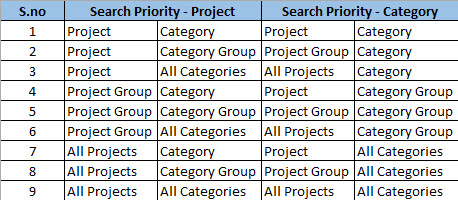
Project Posting Setup in relation to Search priority (Project / Category)

Similar to the Line property concept explained above, the selection of the appropriate ledger account for posting is determined by the Search priority. Please find the table below to understand how the search priority concept works.


Thanks
Sarang


Sunday, October 18, 2015

Project Field Depth


Project ID field is 20 characters long in AX 2012 R2 CU7.

AOT – Data Tables – Extended Data Types – ProjID.


The project ID length error sometimes occurs even when the previous project ID is of length of 17. 
This is because the moment the next project is created, the ‘Sub-project ID format’ field from the project is filled with the 'Default sub-project ID format' from the project parameters. 


System validates that assuming that the next project is created and shows the project length error. To get around this problem, go to project parameters remove the default sub-project ID format setup and then setup the sub-project. 

When the limit of the project id length reaches the Sub-project ID format field displays blank. Even if the user tries to enter # in it system errors.


Thanks
Sarang

Friday, October 9, 2015

Expense Ledger Postings


Expense Postings has been the most complex issue because of the number of different areas in which the postings can be setup. The difficult part is when we are asked to correlate what meaning does the posting setup has and what amount posts where based on scenario. On top of it, to add to the complexity, we do have Expense Journal, Expense Report from EP and because that was not enough we do have project and non-project expense. Whoa..!

To cut through the clutter and to present the settings in a much simpler fashion i came up with this grid which will be handy to find out where the postings are coming from, in any scenario and how the system is behaving. The grid is as follows:


Thanks
Sarang